Flint tremolo and reverb - logo Flint tremolo and reverb - angle view

Flint tremolo and reverb - rear view


Flint user manual   Download user manual

Flint Support


Flint Usage

Will my secondary function settings be saved even after I power my pedal down?

Yes. Once you adjust the secondary function settings on your Strymon pedal they will not change after powering down your pedal until you manually change them again.

How do I enable the TRS stereo input on Flint?

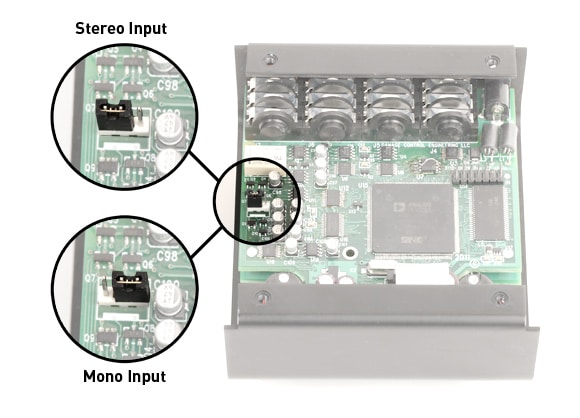
The input on Flint can be set for either mono input or TRS stereo input. Flint ships in mono configuration from the factory. Here’s how to adjust this configuration.

Remove the back cover of your pedal.

On the left side of the circuit board, you’ll see a jumper that can be set in two positions. Place the jumper on the left 2 pins for TRS stereo input. Place the jumper on the right 2 pins for mono input.

TRS stereo input - mono input

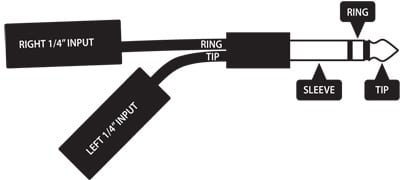
In order to use the TRS stereo input, you’ll need a TRS stereo input adapter like the one shown below. You can purchase one here.

TRS cable

What kind of external TAP tempo switch will work with the TimeLine, Mobius, and Flint pedals?

The Strymon TAP Favorite switch is the perfect TAP tempo switch for TimeLine, Mobius, or Flint. Please visit the TAP Favorite Product Page on our website for more information.

If you’d prefer to go with another external TAP tempo switch, we can’t recommend a specific one for you but, as long as the switch is designed with a momentary, single pole, double throw (SPDT) type switch that switches the TIP between the SLEEVE (ground or 0VDC) to the RING (5VDC) it should work fine.

If you are unsure whether or not your TAP tempo switch provides these specs we kindly ask that you please contact the manufacturer of that switch for more information.

Does Flint have an analog dry path?

If you’re using just the Reverb, your dry path is analog. This means that the mix occurs in analog, your dry signal has zero latency and it’s not converted to digital.

When the Tremolo is engaged, the entire signal is effected by the Tremolo, so there is no dry path in that case.

How do I set up my Strymon pedal to use a Favorite Switch?

NOTE: The EXP jack is set up to use an Expression pedal by default.

To set up your Strymon pedal to use a Favorite Switch, follow the steps below.

1. Power down your Strymon pedal.

2. Configure pedal and power on.

Pedals with toggle Switches – Set both toggle switches to the MIDDLE position. While holding down both footswitches, power up your pedal.

Pedals without toggle switches – While holding both footswitches, power up your pedal, Continue holding footswitches and turn the topmost left knob fully clockwise.

3. Let go of TAP and BYPASS.

Your pedal has now been configured to use the Favorite Switch.
– Press FAVORITE to engage your favorite setting.
– Press and hold BYPASS to save a new favorite settings.

Power

Do Strymon pedals include power supplies?

All Strymon pedals sold within North America (except OB.1) include a 9VDC 660mA power supply. OB.1 includes a 9V battery.

What are the power supply requirements?

We recommend a power supply that provides 9VDC (center negative) at a minimum of 250mA.

Do not subject your Strymon pedal to any voltage above 9V. Doing so will damage your pedal and void your warranty.

Can I use a Voodoo Labs Pedal Power 2+?

All pedals (except TimeLine):

You can, but please take these precautions:

First, make sure the dip switch on the bottom of your Pedal Power is set to the NORMAL (9V) position. Do not subject your Strymon pedal to any voltage above 9V. Doing so will damage your pedal and void your warranty.

El Capistan, Brigadier, blueSky, Lex, Ola, and Orbit, require a minimum of 250mA. You will need to use output 5 or 6 on your Pedal Power 2+. OB.1 requires 20mA, so you can use outlets 1 through 4. Make sure to use the Pedal Power 2+, the original Pedal Power 2 does not provide enough mA.

A better solution would be to use the Voodoo Lab Pedal Power Digital power supply which offers several 9V DC high current output outlets.

Can I use a daisy chain power supply?

We don’t recommend using daisy chain power supplies. Ground loops are commonly caused when using a daisy chain power cable to power multiple pedals. This creates a ground loop between every pedal in the daisy chain. Ground loops allow stray magnetic fields to introduce hum into your signal path.

If the only type of effect you use is distortion you may not have (or hear) the ill effects. But, if you have modulation and delay pedals the likelihood of ground loops wreaking havoc on your signal is high.

If you don’t plan on using your Strymon power supply, we recommend an isolated power supply. The Voodoo Labs Pedal Power Digital and Iso-5 are some examples of cost effective, multiple output isolated power supplies. An isolated supply works by using a transformer (or multiple transformers) to keep every power outlet completely electrically isolated.

Flint Specs

Are the Flint reverbs the same as the blueSky reverbs?

No. The reverbs in Flint are completely different than those in blueSky, in philosophy, the way they were designed, and how they sound. The goal of each Flint reverb was to capture the sound of an era, whereas blueSky reverbs are our take on awesome fidelity with ultimate flexibility.

Where are Strymon pedals made?

All Strymon products are crafted with love in the USA, right in the Los Angeles, California area.

What are the dimensions of my pedal?

blueSky, Brigadier, El Capistan, Flint, Lex, OB.1, Ola, and Orbit are all 4.5″ deep x 4″ wide x 1.75″ tall.

General Product Info

Do your DSP-driven pedals handle both instrument and line levels?

Yes, they feature high-impedance inputs and accept up to +8dBu, instrument or line level.

Warranty

What is the Strymon product warranty?

Strymon Non-Transferrable Limited Warranty

Warranty
Strymon warrants the product to be free from defects in material and workmanship for a period of one (1) year from the original date of purchase. If the product fails within the warranty period, Strymon will repair or, at our discretion, replace the product at no cost to the original purchaser.

Exclusions
This warranty covers defects in manufacturing discovered while using this product as recommended by Strymon. This warranty does not cover loss or theft, nor does the coverage extend to damage caused by misuse, abuse, unauthorized modification, improper storage, lightning, or natural disasters. Damage caused by any of the above circumstances may result in a non-warranty repair fee. 

Limits of Liability
In the case of malfunction, the purchaser’s sole recourse shall be repair or replacement, as described in the preceding paragraphs. Strymon will not be held liable to any party for damages that result from the failure of this product. Damages excluded include, but are not limited to, the following: lost profits, lost savings, damage to other equipment, and incidental or consequential damages arising from the use, or inability to use this product. In no event will Strymon be liable for more than the amount of the purchase price, not to exceed the current retail price of the product. Strymon disclaims any other warranties, express or implied. By using the product, the user accepts all terms herein.

How to Obtain Service Under this Warranty
For North American customers: Contact Strymon through our website at http://www.strymon.net/support for Return Authorization and information. Proof of original ownership may be required in the form of a purchase receipt.

For International Customers: Contact the Strymon dealer from which the product was purchased from in order to arrange warranty repair service.

Where is my warranty valid?

Your warranty is valid in the region of purchase. For example, if you buy your product in Japan, any service-related issues will need to be handled in Japan. Only products purchased in the United States can be repaired in the United States.


Email Support

Please direct all support inquiries to our support email:
support@strymon.net

We try our very best to respond to requests within 1 business day.


Strymon Facebook page     Strymon Twitter link     Strymon YouTube link     Strymon Instagram link     Strymon Pinterest link     Strymon RSS link


Learn more about the team. Read More »