Brig has minimum and maximum delay time ranges for each of the three VOICES.
3205: 30 – 300ms
3005: 100ms – 1s
MULTI: 100ms – 1s
The maximum range is extended to 2 seconds when using tap tempo or MIDI clock.
Free US Shipping On Orders Over $49
Easy 30-Day Returns
Financing Available Through 

Brig has minimum and maximum delay time ranges for each of the three VOICES.
3205: 30 – 300ms
3005: 100ms – 1s
MULTI: 100ms – 1s
The maximum range is extended to 2 seconds when using tap tempo or MIDI clock.
Performing a Factory Reset restores the pedal to its factory default Power Up functions, and replaces all stored presets with their factory default settings.
From the factory, with the rear I/O Mode Selector set to mono, Brig is set for True Bypass as the default. There are several benefits to setting Brig to Buffered Bypass mode:
To change the bypass mode on Brig:
NOTE: With the rear I/O Mode Selector set to mono -> stereo or stereo, the bypass mode is automatically set to Buffered Bypass.
To begin using Brig with an external MIDI device, connect the MIDI out jack from a pedal, controller, or computer interface to the EXP/MIDI jack on Brig. The following devices can be used to send MIDI messages to Brig:
Set the EXP/MIDI jack to MIDI Mode
Turn the TIME knob to set the MIDI communication channel. The LED indicates status. Your knob selections are as follows:
• Channel 1: GREEN (default, minimum)
• Channel 2: AMBER (10 o’clock)
• Channel 3: RED (12 o’clock)
• Channel 4-16: BLUE (maximum) – set by next received MIDI Program Change message, requires 1⁄4″ MIDI connection
Once the LED turns BLUE, it will blink until the pedal receives a MIDI Program Change message. Once a message is received, the pedal will be set to the MIDI channel that carried the message and exits the Power Up Mode to allow you to begin using Brig.
Press the footswitch to exit and store your MIDI Channel setting and begin using Brig.
Press and hold the footswitch for at least 2 seconds while powering up Brig. Once the LED flashes, release the footswitch.
Turn the FILTER knob to select what kind of MIDI data is sent from Brig to other MIDI devices. The LED will flash momentarily to indicate your selection. Please note that MIDI OUT must be set to OFF when using a Strymon MIDI EXP cable.
• OFF: RED (default, minimum) – No MIDI messages are sent out of
Brig.
• THRU: BLUE (11 o’clock) – Incoming MIDI messages are sent to
the MIDI Out without any additional MIDI messages generated by
Brig.
• SEND CC, OTHER: GREEN (1 o’clock) – MIDI CC and Sysex
messages generated by Brig are sent to the MIDI Out.
• SEND OTHER: AMBER (maximum) – Sysex messages generated
by Brig are sent to the MIDI Out.
Press the footswitch to store the MIDI Output Mode and exit.
Brig features an onboard tap tempo function, despite having only a single footswitch.
To set the TAP DIVISION for both external and Onboard Tap modes:

To configure your Brig and MultiSwitch Plus to work with each other:
There are two separate modes of operation for MultiSwitch Plus and Brig- Preset Mode, and Tap-Fav-Infinite Mode.
To save a preset on Brig with MultiSwitch Plus:
To select a preset on Brig with MultiSwitch Plus:
MultiSwitch Plus has two modes of operation with Brig: PRESET Mode and Custom Mode. Each of these modes require configuring Brig in the following manner:
To set MultiSwitch Plus to PRESET mode:
To set MultiSwitch Plus to CUSTOM mode:
MiniSwitch has a variety of uses with Brig, and can be set to activate Infinite Repeats, serve as an external tap tempo, or recall a single saved FAVORITE preset. To Configure Brig’s EXP/MIDI Jack for each of these modes:
The following EXP/MIDI Jack Modes are compatible with Strymon MiniSwitch:
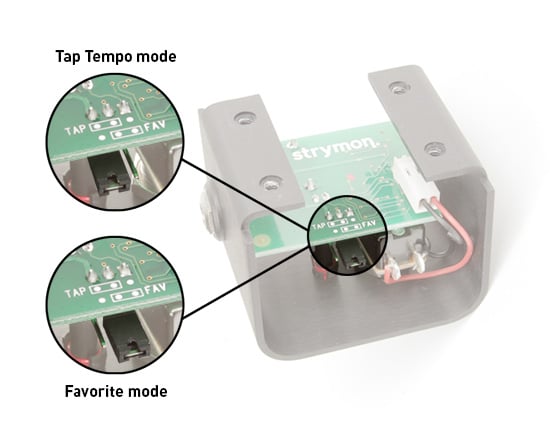
Brig’s MIDI clock can be engaged or disengaged by sending a CC#63 message to the pedal.
To engage MIDI clock (default), send a CC#63 with a value between 1-127.
To disengage MIDI clock, send a CC#63 with a value of 0.
No, Brig does not ship with a power supply. Please use a compatible power supply that outputs 9V DC, center-negative, 250mA minimum. We recommend our Ojai and Zuma isolated power supplies. You can also use a wall wart power supply with compatible specifications.
Strymon Non-Transferrable Limited Warranty
Strymon warranties its products and their varying components to be free from defects in material and workmanship for the following periods of time from the original date of purchase when purchased from an Authorized Strymon Dealer:
If the product fails within the warranty period, Strymon will repair or, at our discretion, replace the product at no cost to the original purchaser.
This warranty covers defects in manufacturing discovered while using this product as recommended by Strymon. This warranty does not cover loss or theft, nor does the coverage extend to damage caused by misuse, abuse, unauthorized modification, improper storage, lightning, or natural disasters. Damage caused by any of the above circumstances may result in a non-warranty repair fee.
Products that were purchased from an unauthorized dealer are not covered under warranty. The warranty is non-transferrable and does not cover used or second-hand products.
Products purchased outside of your country (sales channel) have a warranty inside the country it was purchased ONLY and is not valid outside of the country it was purchased. Please contact your dealer for information on warranty and service outside of the USA and Canada.
In the case of malfunction, the purchaser’s sole recourse shall be repair or replacement, as described in the preceding paragraphs. Strymon will not be held liable to any party for damages that result from the failure of this product. Damages excluded include, but are not limited to, the following: lost profits, lost savings, damage to other equipment, and incidental or consequential damages arising from the use, or inability to use this product. In no event will Strymon be liable for more than the amount of the purchase price, not to exceed the current retail price of the product. Strymon disclaims any other warranties, express or implied. By using the product, the user accepts all terms herein.
For North American customers: Contact Strymon through our website at https://www.strymon.net/support for Return Authorization and information. Proof of original ownership may be required in the form of a purchase receipt.
For Customers Outside the USA and Canada: Contact the Strymon dealer from which the product was purchased from in order to arrange warranty repair service.
To locate your nearest authorized Strymon dealer, please use the following link:
You can also contact Strymon directly at (805) 468-8788 or (800) 980-8160 for help finding your nearest authorized Strymon dealer.
Strymon products purchased from an authorized dealer are covered by a manufacturer’s warranty. A purchase receipt from an authorized dealer is required with any request for warranty service.
Please note that any Strymon products that have been purchased from an unauthorized dealer are not eligible for coverage under the manufacturer’s warranty. If you are uncertain, please contact Strymon directly at (805) 468-8788 or (800) 980-8160 before your purchase.
***NOTE: Warranties for Strymon products are non-transferrable. Second-hand items, including sales from websites such as craigslist, Ebay, and Reverb are not covered by a manufacturer’s warranty. ***
Your warranty is valid in the region of purchase. For example, if you buy your product in Japan, any service-related issues will need to be handled in Japan. Products purchased in the United States can only be repaired in the United States.