


TimeLine MX can optionally be set for different Input and Output jack routing configurations via Global Settings. To select a
configuration, hold VALUE for 2 seconds to enter the GLOBAL menu, choose I/O Config, then select the desired option.
Normal Configuration– The default Normal configuration offers mono or stereo input and output, determined by the jack connections.
- Input: Connect to the LEFT IN only for mono input. Connect to both the LEFT and RIGHT IN for stereo input.
- Output: Connect to the LEFT OUT only for mono output. Connect to both the LEFT and RIGHT OUT for stereo output.
NOTE– if you intend to send mono in to the pedal and use the RIGHT IN, the pedal will assume stereo input, and route the left input to the left output, and vice versa. This will result in signal loss, as there is no input signal to be routed to the right output.
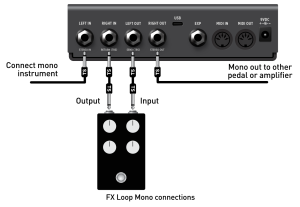
FX Loop Mono and FX Loop Stereo Configurations (4-cable Method)– These options allow the RIGHT IN and LEFT OUT to function as a mono or stereo FX Loop, allowing for configuring TimeLine MX as two independent delay pedals that can be placed at different points in the signal chain.
When using TLMX’s FX Loop configuration (either mono or stereo), the signal is processed as follows: input -> Delay 1 -> Loop -> Delay 2 -> output. This type of routing is commonly referred to as the 4-cable method, most typically used to place effects before and after an amplifer’s preamp section, or before and after an amp modeler. Delay 1 can be set up as a Modulation effect, a slap-back delay, or any delay type that you want to experience shaping by the preamp, and delay 2 can be set up as a delay or reverb that processes the signal after the amp shaping.
The 4 cable method is also useful for situations where you may want to place a drive or fuzz pedal AFTER an Echo to create a washed out and ambient shoegaze sound, but still want a cleaner reverb processing after the Fuzz and the Echo.
- FX Loop Mono: All INs and OUTs are mono. Use standard, Tip-Sleeve (TS) instrument type cables for all connections.
- FX Loop Stereo: Use Tip-Ring-Sleeve (TRS) connections to all TimeLine MX’s IN and OUT jacks for stereo. If using a pedal with dual 1/4″ TS inputs or outputs, it will be necessary to use a TRS -> dual TS splitter. In this instance, the TRS side of the cable would connect to TimeLine MX, and the dual TS connections would connect to the left and right jacks on the looped pedal.

NOTE– For TRS connections, the left channel (hot) is carried on the Tip, the right channel (hot) on the Ring, and the Sleeve is common ground
Wet Dry and Wet Dry Wet Configurations– These options provide the “dry” (unprocessed) input and the “wet” (processed) signals to be routed discretely, such as to two or three amplifiers or mixer channels.
- Wet Dry: The LEFT OUT is a mono, dry-only signal output and the RIGHT OUT is a mono, wet-only output.
- Wet Dry Wet: The LEFT OUT is a mono, dry-only signal output and the RIGHT OUT is a stereo wet-only output. A TRS connection to the RIGHT OUT is required for stereo.